
Brivo, a provider of cloud-based access control and smart building technologies, announces launching support for employee badges in Apple Wallet, expanding its mobile credential options.
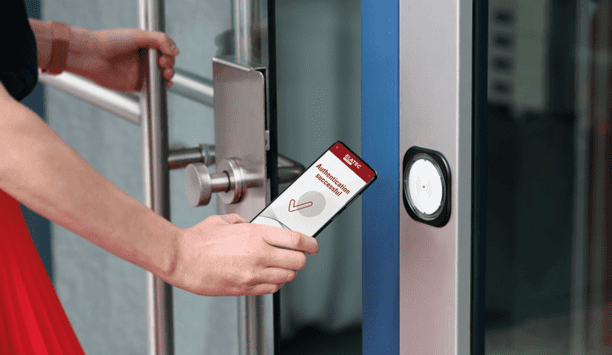
Starting today, Brivo corporate customers can enable employees to easily and securely add their employee badge to Apple Wallet and simply hold their iPhone or Apple Watch near a reader to unlock office doors, turnstiles, elevators, and key card-protected amenity spaces eliminating the need to open an app or present a traditional, physical access key.
Mobile credentials enhancements
Mobile credentials for employee badge in Apple Wallet offers several game-changing enhancements to the user experience that are not currently available with Bluetooth- based Brivo Mobile Pass credentials, including:
- Express Mode, which allows iPhone users who add their employee badge to Apple Wallet to access locations with just a tap, there is no need to unlock or even wake up their device.
- If an iPhone needs to be charged, users can still use their device to access office spaces and amenities for up to 5 hours with Power Reserve.
- If an employee’s Apple device is lost, they can easily disable their employee badge using Apple's FindMy app.
Secure, fluid experience
We're excited to announce the launch to bring a new level of ease and convenience to their employee experience"
"We're excited to announce the launch of this capability for our corporate customers to bring a new level of ease and convenience to their employee experience," said Steve Van Till, Founder and CEO of Brivo.
He adds, “With employee badge in Apple Wallet, companies can provide a secure, fluid experience for employees to access their spaces with just a tap of their iPhone or Apple Watch."
Brivo Mobile Pass
Brivo was a pioneer in mobile credentials with the launch of the Brivo Mobile Pass in 2015 and has issued over 2 million mobile credentials since.
By expanding to add employee badges in Apple Wallet support, Brivo continues to lead the way in introducing the frictionless, mobile access experience to every space.
Brivo Access platform
Brivo’s corporate customers can issue employee badges in Apple Wallet through the Brivo Access platform. Users simply download the Brivo Mobile Pass mobile application and then tap “Add to Wallet'' within the app to safely and securely add their employee badge to Apple Wallet.
At launch, support for employee badges in Apple Wallet will be available to Brivo customers through its reseller channel in the United States.

- Network / IP
- Electronic security systems
- Application security
- Physical security
- Industrial security
- Commercial security
- Private sector security
- Public sector security
- Security management
- Security policy
- Security tagging
- Security monitoring system
- Security access systems
- Network monitoring
- Electronic access control
- Public security
- Industrial security systems
- Wireless security
- Door access control
- Security software
- Security service
- Industrial surveillance
- Mobile surveillance
- Physical Security Information Management (PSIM)
- Indoor surveillance
- Testing & Approvals
- Integration software
- Cyber security
- Mobile communications
- Corporate Security
- Indoor Security
- Central Monitoring
- Data Security
- Cloud security
- Mobile access
- Touchless Security