SecurityInformed.com
  • Products
    Video Surveillance
    • Surveillance cameras
    • Video Surveillance software
    • IP cameras
    • Digital video recorders (DVRs)
    • Dome cameras
    • Network Video Recorders (NVRs)
    • IP Dome cameras
    • Security camera lenses
    Access Control
    • Access control readers
    • Access control software
    • Access control controllers
    • Access control systems & kits
    • Intercom Systems
    • Electronic lock systems
    • Access control cards/ tags/ fobs
    • Access control accessories
    Intruder Alarms
    • Intruder alarm system control panels & accessories
    • Intruder detectors
    • Intruder alarm warning devices
    • Intruder alarm communicators
    • Intruder alarm accessories
    • Intruder alarm lighting systems
    One System, One Card
    One System, One Card
    Hikvision AOV 4G Solar Camera Series for Off-Grid Video Security

    Hikvision AOV 4G Solar Camera Series for Off-Grid Video Security

    KentixONE – IoT Access And Monitoring For Data Centers

    KentixONE – IoT Access And Monitoring For Data Centers

    Climax Technology HSGW-Gen3 Modular Smart Security Gateway

    Climax Technology HSGW-Gen3 Modular Smart Security Gateway

    Delta Scientific DSC50 ‘S’ Barrier: Portable, Crash-Rated Vehicle Mitigation Solution

    Delta Scientific DSC50 ‘S’ Barrier: Portable, Crash-Rated Vehicle Mitigation Solution

  • Companies
    Companies
    • Manufacturers
    • Distributors
    • Resellers / Dealers / Reps
    • Installers
    • Consultants
    • Systems integrators
    • Events / Training / Services
    • Manned guarding
    Companies by Product area
    • CCTV
    • Access control
    • Intruder alarm
    • IP networking products
    • Biometrics
    • Software
    • Digital video recording
    • Intercom systems
    One System, One Card
    One System, One Card
  • News
    News
    • Product news
    • Corporate news
    • Case studies
    • Events news
    Latest
    • Alcatraz Completes SOC 2 Audit With A-LIGN
    • Datalogic Showcases AI-Driven Retail Solutions At NRF 2026
    • Deep Sentinel's Solar-Powered Security Solution
    • Eplan And CADENAS Partner For Device Data Expansion
    One System, One Card
    One System, One Card
  • Insights
    Insights
    • Expert commentary
    • Security beat
    • Round table discussions
    • Round Table Expert Panel
    • eMagazines
    • Year in Review 2023
    • Year in Review 2022
    Featured
    • Why Open Matters In The Age Of AI
    • What Are Emerging Applications For Physical Security In Transportation?
    • What Is the Most Overlooked Factor When Installing Security Systems?
    • Amid Rising Certificate Demands, Stricter Compliance And Quantum Threats, PKIaaS Is A Necessity
    One System, One Card
    One System, One Card
  • Markets
    Markets
    • Airports & Ports
    • Banking & Finance
    • Education
    • Hotels, Leisure & Entertainment
    • Government & Public Services
    • Healthcare
    • Remote Monitoring
    • Retail
    • Transportation
    • Industrial & Commercial
    One System, One Card
    One System, One Card
    Alamo Colleges Boosts Safety With Alcatel-Lucent OmniSwitch Platform

    Alamo Colleges Boosts Safety With Alcatel-Lucent OmniSwitch Platform

    HID Mobile Access Enhances University Of Dundee Campus

    HID Mobile Access Enhances University Of Dundee Campus

    ASSA ABLOY Aperio Wireless Locks At The Camp: Secure & Sustainable

    ASSA ABLOY Aperio Wireless Locks At The Camp: Secure & Sustainable

    SBB Secures Perimeters With Hanwha Vision Cameras

    SBB Secures Perimeters With Hanwha Vision Cameras

  • Events
    Events
    • International security
    • Regional security
    • Vertical market
    • Technology areas
    • Conferences / seminars
    • Company sponsored
    Virtual events
    • Video Surveillance
    • Access Control
    • Video Analytics
    • Security Storage
    • Video Management Systems
    • Integrated Systems
    One System, One Card
    One System, One Card
    Intersec Dubai 2026

    Intersec Dubai 2026

    DIMDEX 2026

    DIMDEX 2026

    DISTRIBUTECH International 2026

    DISTRIBUTECH International 2026

    Munich Security Conference (MSC) 2026

    Munich Security Conference (MSC) 2026

  • White papers
    White papers
    • Video Surveillance
    • Access Control
    • Video Analytics
    • Video Compression
    • Security Storage
    White papers by company
    • HID
    • ASSA ABLOY Opening Solutions
    • Milestone Systems
    • Eagle Eye Networks
    • Software House
    Other Resources
    • eMagazines
    • Videos
    One System, One Card

    One System, One Card

    Aligning Physical And Cyber Defence For Total Protection

    Aligning Physical And Cyber Defence For Total Protection

    Understanding AI-Powered Video Analytics

    Understanding AI-Powered Video Analytics

    Modernizing Access Control

    Modernizing Access Control

About us Advertise
  • Wire-Free Locks
  • AI special report
  • Cybersecurity special report
  • Casino security & surveillance
  • 6
Video surveillance
  • Home
  • About
  • News
  • Expert commentary
  • Security beat
  • Case studies
  • Round table
  • Products
  • White papers
  • Videos

Check Out Our Special Report On Casino Security

Get it now!

DNAKE 280M: New Roll Call & SOS Features Explained

7 Mar 2023

DNAKE 280M: New Roll Call & SOS Features Explained
Contact company
Contact DNAKE
icon Add as a preferred source Download PDF version
Quick Read
⌵
Summary is AI-generated, newsdesk-reviewed
  • DNAKE 280M enhances security with automatic roll call, SOS optimization, screen lock features.
  • User-friendly updates: Intuitive UI, upgraded phonebook, and three-door unlock functionality.
  • Improved camera integration boosts security; supports live monitoring and access control.
Related Links
  • 4 Trends To Follow At ISC West

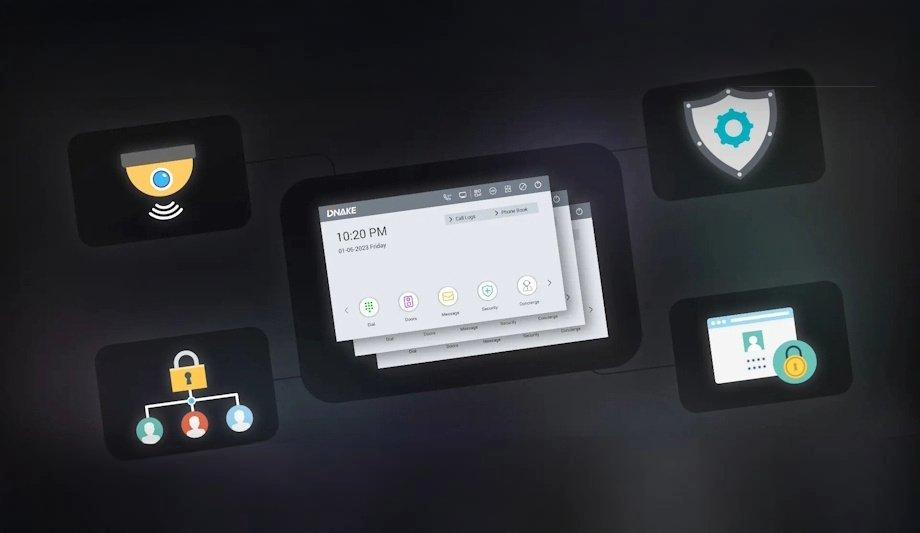
Several months passed since the last update, DNAKE 280M Linux-based indoor monitor has come back even better and stronger with significant improvements to security, privacy, and user experience, making it an even more reliable and user-friendly indoor monitor for home security. This time’s new update includes:

  • New security and privacy features put them in control
  • Create a more user-friendly experience
  • Camera integration and optimization

New security and privacy features put them in control

Newly added automatic roll call master station

Creating a safe and smart residential community is the heart of what they do

Creating a safe and smart residential community is the heart of what they do. The new automatic roll call master station feature in DNAKE 280M Linux-based indoor monitors is certainly a valuable addition to enhance community security.

The feature is designed to ensure that residents can always reach a concierge or guardsman in the event of an emergency, even if the first point of contact is unavailable.

Safety and security in residential communities

Imagining this, they are troubled by an emergency and trying to call a certain concierge for help, but the guardsman is not in the office, or the master station is on the phone or offline. Hence, no one could answer the call and assist, which may result in worse.

But now they don’t have to. The automatic roll call function works by automatically calling the next available concierge or guardsman if the first one doesn’t answer. This feature is a great example of how the intercom can improve safety and security in residential communities.

SOS emergency call optimization

The SOS icon can be readily found in the right upper corner of the home screen

Hope they never need it, but it is a must-know function. Being able to signal for help quickly and effectively can make a big difference in a dangerous situation. The main purpose of SOS is to let the concierge or security guard know that they're in trouble and request help.

The SOS icon can be readily found in the right upper corner of the home screen. DNAKE master station will be noticed when someone triggers SOS. With 280M V1.2, users can set the trigger time length on the webpage as 0s or 3s. If the time is set to 3s, users need to hold the SOS icon for 3s to send out an SOS message to prevent accidental triggering.

Secure the indoor monitor with a screen lock

An extra layer of security and privacy can be offered by screen locks in 280M V1.2. With the screen lock enabled, they will be asked to enter a password each time they want to unlock or switch the indoor monitor on. It's good to know that the screen lock function won't interfere with the ability to answer calls or open doors.

They bake security into every detail of DNAKE intercoms. Try to upgrade and enable the screen lock function on the DNAKE 280M indoor monitors as of today to enjoy the following benefits:

  • Privacy protection. It can help protect call logs and other sensitive information from unauthorized access.
  • Help prevent accidental changes to security sensor parameters, ensuring that they continue to work as intended.

Create a more user-friendly experience

Minimalist and Intuitive UI

They pay close attention to customers’ feedback. 280M V1.2 keeps optimizing the user interface to provide a better user experience, making it easier and more enjoyable for residents to interact with the DNAKE indoor monitors. 

  • Optimizing the branded home page. Creating a more visually appealing and easy-to-navigate starting point for residents.
  • Dial interface optimization. Making it simpler and more intuitive for residents to select the desired options.
  • Upgrading the Monitor & Answer interface to be shown in full screen for a more immersive experience.

Phonebook scaled up for easy communication

What is the phonebook? 

The intercom phonebook, also called the intercom guide, allows two-way audio and video communication

The intercom phonebook also called the intercom directory, allows two-way audio and video communication between two intercoms. 

The phonebook of the DNAKE indoor monitor will help them save frequent contacts, which will make it easier to catch the neighborhoods, making communication much more efficient and convenient. In 280M V1.2, they can add up to 60 contacts (devices) to the phonebook or selected ones, based on their preference.

How to use the DNAKE intercom phonebook? 

Go to Phonebook, they will find a contact list they have created. Then, they can scroll through the phonebook to locate someone they’re trying to reach and tap on their name to call. Moreover, the whitelist feature of the phonebook provides an extra layer of security by limiting access to only authorized contacts.

In other words, only the selected intercoms can reach they and others will be blocked. For example, Anna is in the whitelist, but Nyree isn’t in it. Anna can call in while Nyree can’t.

More convenience brought by three-door unlock

Residents can use the DNAKE 280M indoor monitor or the DNAKE Smart Life app to control

Door release is one of the vital functions for video intercoms, which enhances security and simplifies the access control process for residents. It also adds convenience by allowing residents to remotely unlock doors for their visitors without having to physically go to the door. 280M V1.2 allows unlocking up to three doors after configuration. This feature works great for lots of the scenarios and requirements.

If the apartment door phone supports three relay outputs as DNAKE S615 and S215, probably the front door, back door, and side entrance, they can control these three door locks in one central location, i.e., the DNAKE 280M indoor monitor. Relay types can be set as Local Relay, DTMF, or HTTP.

It is available to connect residents’ own door lock via the local relay to the DNAKE indoor monitor as it has one relay output. This feature is particularly useful for residents who have additional security measures in place, such as electronic or magnetic locks. Residents can use the DNAKE 280M indoor monitor or the DNAKE Smart Life app to control both the apartment entrance lock and their own door lock.

Camera integration and optimization

Details of camera optimization

Boosted by increased functionality, IP intercoms continue to grow in popularity. A video intercom system includes a camera that helps the resident view who is requesting access before granting their access. Furthermore, the resident can monitor the live stream of the DNAKE door station and IPCs from their indoor monitor. Here are some key details of camera optimization in the 280M V1.2.

  • Two-way audio: Microphone function added in the 280M V1.2 allows two-way audio communication between resident and the person requesting access. This is useful for verifying the identity of the person and for communicating instructions or directions.
  • Notification display: Calling notification will be shown in name when they monitor DNAKE door station, allowing residents to know who is calling.

Camera optimization in the 280M V1.2 further enhance the functionality of DNAKE 280M indoor monitors, making it a useful tool for controlling access to buildings and other facilities.

Easy and Broad IPC Integration

Integrating IP intercom with video surveillance is a great way to enhance security and control over building entrances. By integrating these two technologies, operators and residents can monitor and manage access to the building more effectively which can increase safety and prevent unauthorized entry.

DNAKE enjoys broad integration with IP cameras, making it a great choice for those looking for a seamless experience, and easy-to-manage and flexible intercom solutions. After integration, residents can view live video stream from IP cameras directly on their indoor monitors. 

From facial recognition to LiDAR, explore the innovations redefining gaming surveillance

Download PDF version Download PDF version
Google logo Add as a preferred source on Google
  • Network / IP
  • Security cameras
  • Covert cameras
  • Security camera systems
  • Video analytics
  • Security guards
  • Covert Surveillance
  • Fingerprint Locks
  • Network Video Recorders
  • Video surveillance
  • Related links
  • Network IP cameras
  • Thermal IP cameras
  • Related categories
  • Power supplies & batteries
  • IP cameras
  • Barricades
  • Barriers
Related white papers
Aligning Physical And Cyber Defence For Total Protection

Aligning Physical And Cyber Defence For Total Protection

Download
Understanding AI-Powered Video Analytics

Understanding AI-Powered Video Analytics

Download
Combining Security And Networking Technologies For A Unified Solution

Combining Security And Networking Technologies For A Unified Solution

Download
Related articles
Deep Sentinel's Solar-Powered Security Solution

Deep Sentinel's Solar-Powered Security Solution

Videonetics AI Video Analytics At Partner Connect 2025

Videonetics AI Video Analytics At Partner Connect 2025

Genetec's 2026 Physical Security Trends And Insights

Genetec's 2026 Physical Security Trends And Insights

Follow us

Sections Products Video Surveillance Access Control Intruder Alarms Companies News Insights Case studies Markets Events White papers Videos AI special report Cybersecurity special report Casino security & surveillance RSS
Topics Artificial intelligence (AI) Mobile access Healthcare security Cyber security Counter terror Robotics Thermal imaging Intrusion detection Body worn video cameras
About us Advertise About us 10 guiding principles of editorial content FAQs eNewsletters Sitemap Terms & conditions Privacy policy and cookie policy Californian Residents (CCPA)
  1. Home
  2. Topics
  3. Video surveillance
  4. News
  5. Corporate news
About this page

Discover the enhanced DNAKE 280M indoor monitor with new roll call and SOS features for improved residential security. Experience seamless camera integration and user-friendly interfaces that redefine home safety.

Subscribe to our Newsletter

Stay updated with the latest trends and technologies in the security industry
Sign Up

DMA

SecurityInformed.com - Making The World A Safer Place
Copyright © Notting Hill Media Inc. 2000 - 2025, all rights reserved

Our other sites:
SourceSecurity.com | TheBigRedGuide.com | HVACinformed.com | MaritimeInformed.com | ElectricalsInformed.com

Subscribe to our Newsletter


You might also like
One System, One Card
Understanding AI-Powered Video Analytics
Security And Surveillance Technologies For The Casino Market
Modernizing Access Control
Sign up now for full access to SecurityInformed.com content
Download Datasheet
Download PDF Version
Download SecurityInformed.com product tech spec