RGB Spectrum, Inc - Experts & Thought Leaders






Latest RGB Spectrum, Inc news & announcements
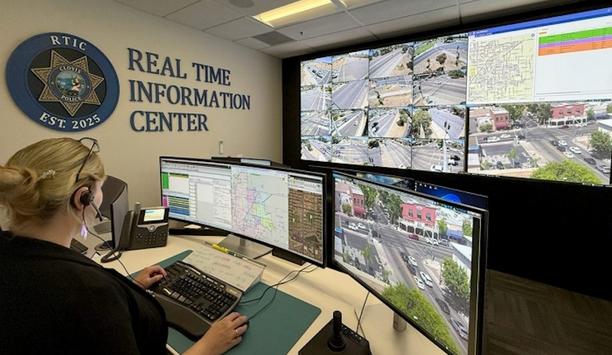
Located in the heart of California’s Central Valley, the Clovis Police Department serves the rapidly growing community of Clovis, California—a vibrant city situated just northeast of Fresno in Fresno County. Home to over 129,000 residents, Clovis is known for its strong community values, family-friendly neighborhoods, and forward-thinking city leadership. Once a historic railroad town, Clovis has transformed into a modern, thriving municipality, consistently ranked among California’s best places to live. Real-time public safety technology Clovis maintains a lean public safety model, with about 130 sworn officers and a total department staff Despite its growth, Clovis maintains a lean public safety model, with approximately 130 sworn officers and a total department staff of about 230 employees. The department takes pride in its reputation for innovation, responsiveness, and community trust, often operating with fewer resources than larger metropolitan areas—yet delivering highly efficient and effective policing services. As the city continues to expand—adding new residential developments, commercial centers, and educational infrastructure—the need for advanced, real-time public safety technology has never been greater. Commitment to innovation and collaboration Recognizing this, Clovis PD launched a bold initiative to build a Real Time Information Center (RTIC)—a centralized hub designed to unify data from hundreds of surveillance cameras, license plate readers, dispatch systems, drone feeds, and body-worn cameras. The department’s goal: enhance officer safety, accelerate response times, and support smarter decision-making across the entire public safety ecosystem. With a deep commitment to innovation and collaboration, the Clovis Police Department is setting the standard for what’s possible in modern law enforcement. The challenge For Clovis PD, the answer began with re-imagining how real-time data is gathered, visualized, and acted upon As technology rapidly reshapes the public safety landscape, Clovis PD faced a key question: How could a lean, high-performing department continue to meet the demands of a growing city while maintaining visibility, speed, and responsiveness across a diverse set of threats and situations? For Clovis PD, the answer began with re-imagining how real-time data is gathered, visualized, and acted upon. The department managed streams of mission-critical information from hundreds of surveillance cameras, LPRs, drones, dispatch systems, and body-worn cameras—but these assets were siloed and difficult to manage from a single point of control. Officers and dispatchers needed faster access to the right information at the right time, and leadership needed a way to centralize command operations without overwhelming staff or adding layers of complexity. Future of real-time collaboration What Clovis required was a unified platform that could make sense of multiple inputs, prioritize action, and scale as the city’s needs evolved. It had to be powerful, but also intuitive and accessible to analysts, officers, and supervisors alike. Most importantly, it needed to be built in a way that would support not just the workflows—but the future of real-time collaboration between departments, field units, city pioneers, and neighboring agencies. That vision became the foundation for Clovis PD’s Real Time Information Center (RTIC)—and set the stage for a successful deployment with RGB Spectrum and Wildfire Technology. The RGB Spectrum solution: Zio and XtendPoint in action At the heart of Clovis PD’s RTIC is RGB Spectrum’s Zio® AV-over-IP platform and XtendPoint™ KVM-over-IP system, providing the centralized control, flexible visualization, and easy expandability the department needed. Powering the visual backbone The Zio 4000 video wall processor seamlessly drives a 14’ × 5.6’ Barco TruePix 0.9 mm pixel pitch LED video wall, displaying live video from across the city, interactive maps, drone feeds, dispatch data, and analytic tools. With 16 HDMI inputs and 12 outputs, Zio acts as the visual brain of the RTIC—integrating diverse content streams into a single pane of glass for maximum awareness. Operators can quickly shift between presets for specific scenarios (e.g., drone deployment, vehicle pursuit, or major traffic events). Video streams are not only viewable in the RTIC but are routed to other locations, including Dispatch, the Emergency Operations Center (EOC), supervisor offices, and field units. Zio also supports future integration with remote web access portals—allowing city officials and council members to view situational data during major incidents. Control with confidence Clovis PD operators use RGB Spectrum’s XtendPoint KVM-over-IP to control and interact with up to eight systems Clovis PD operators use RGB Spectrum’s XtendPoint KVM-over-IP to control and interact with up to eight independent systems simultaneously using a single keyboard and mouse. Each operator station features two 43″ curved 4K displays, creating a panoramic, ergonomic environment that consolidates workflows and boosts productivity. “What sold me on RGB was how effortless it was for everyone to manipulate the screen and display what they needed—everyone had access, and it just worked,” Chief Fleming, Chief of Police, Clovis Police Department. This intuitive plug-and-play interface significantly reduces training time and enables officers, dispatchers, and analysts to work fluidly between tasks—whether monitoring cameras, controlling drones, running license plates, or launching live body cam feeds. Future-ready architecture: Built to expand RGB Spectrum’s IP-based architecture offers the flexibility Clovis PD needs to grow and adapt over time: Drone Expansion: As Clovis expands its DFR (Drone as First Responder) program with multiple Brink drone launch sites, the system will support direct drone video integration into the video wall and remote routing to field teams and fire personnel. Body-Worn Cameras: Using Axon’s new Respond technology, live body cam video is now accessible in real time—giving analysts and dispatchers critical visual data, especially when officers can’t communicate via radio. Mobile Command & Trailers: RGB Spectrum’s architecture enables future integration with mobile assets like camera trailers and portable operations centers, giving Clovis PD the tools to bring their RTIC capabilities to festivals, parades, emergencies, and other offsite events. “We’re not just solving for today’s challenges—we’re setting the foundation for tomorrow’s public safety technology,” said Chief Fleming. The human factor: Designed for everyday use From video wall presets to XtendPoint switching, every component was designed with the operator in mind Despite the complexity of the system’s backend, Clovis PD has found it remarkably easy to use. From video wall presets to XtendPoint switching, every component was designed with the operator in mind. Chief Fleming notes that even with staff rotating through dispatch or new to the RTIC, most users are up and running with minimal training. As the department continues to grow its analytics and drone teams, they’re confident in scaling the system further—without retraining or major technical overhauls. Inter-agency collaboration & City Council engagement The new RTIC isn’t just benefiting Clovis PD—it’s elevating collaboration with fire, EMS, and neighboring jurisdictions. Fire & EMS: Fire department command staff are integrated into the drone viewing platform, allowing them to view aerial video in real time from their phones or tablets. County-wide Visibility: Drone video and surveillance feeds are shareable with county partners via secure portals, enabling unified situational awareness across jurisdictions. City Council Access: The Zio platform can generate remote viewing links that allow City Council and department heads to access selected live data and camera feeds during major incidents or EOC activations—keeping decision-makers informed without disrupting operations. This capability has not only improved response times and safety but has also proven to be a valuable selling point for gaining city support. Community pioneers now have full visibility into how investments in public safety technology translate to real-world benefits. The role of Wildfire Technology: Seamless execution As the system integrator, Wildfire Technology delivered end-to-end project success. From vendor selection and budgeting to installation, training, and post-deployment support, Wildfire guided Clovis PD every step of the way. Created detailed project plans and electrical requirements Helped secure sole-source documentation to streamline approval Completed installation and commissioning in under 30 days Provided responsive support and firmware updates post-launch “Everything was clean, professional, and ahead of schedule. Their team cared about the space like it was their own. That kind of integrity is rare,” Chief Fleming. Forward-thinking technology deployment From integrated drone surveillance and mobile command capabilities to remote city leadership access Clovis PD’s RTIC is built not just for now—but for the evolving needs of tomorrow. From integrated drone surveillance and mobile command capabilities to remote city leadership access and future third-party analytics platforms, the department is thinking beyond traditional law enforcement. They’ve already begun planning to host open houses and agency tours, sharing their story to help others nationwide modernize their own public safety operations. “If something doesn’t work, we’ll say so. But RGB Spectrum’s real-time visualization system is absolutely working for us—and we rely on it every day,” Chief Fleming. Final thoughts The partnership between RGB Spectrum and Wildfire Technology helped Clovis PD bring its vision of a fully connected, mission-critical Real Time Information Center to life. The result is a scalable, ergonomic, and operator-friendly environment that strengthens officer safety, improves situational awareness, and increases the department’s ability to respond and adapt in real time. “This isn’t just about the tech—it’s about what the tech enables. And with RGB and Wildfire behind us, we’ve built something that’s going to serve Clovis for years to come,” Chief Fleming.

RGB Spectrum®, a pioneer in mission-critical video solutions for real-time decision support, announced a collaboration with Gemstar® Manufacturing, a specialist in rugged protective packaging, to deliver the IPX Flyaway Kit—a lightweight, fully integrated mobile command center designed for mission-critical deployments. IPX video processing system The two companies are providing field teams with an advanced yet compact solution that delivers powerful visualization Built for rapid deployment in military, defense, and tactical environments, the IPX Flyaway Kit combines RGB Spectrum’s IPX video processing system with Gemstar’s SENTINEL® ruggedized hard case to ensure high performance in the harshest operational conditions. Together, the two companies are providing field teams with an advanced yet compact solution that delivers powerful visualization, real-time data distribution, and reliable communications—when and where it matters most. Deployable, durable, mission-ready The IPX Flyaway Kit is a self-contained mobile command-and-control solution engineered to deliver unmatched video processing, situational awareness, and secure data sharing on the move. Key features include: Real-time visualization with RGB Spectrum’s Zio® AV-over-IP platform, enabling multiview displays, remote video streaming, encoding/decoding, and video wall control. Plug-and-play integration with local and remote video sources, sensors, computers, and displays. Ruggedized SENTINEL® case-on-case by Gemstar Manufacturing, offering watertight, lightweight, durable protection. Military-grade deployment readiness, weighing under 70 pounds and fully operational within minutes. A strategic collaboration for future-ready solutions “We partnered with Gemstar to build a system that meets the extreme durability and performance needs of defense and tactical teams,” said Dan Marcus, Vice President of New Business Development, RGB Spectrum. “The IPX Flyaway Kit is built for the mission—compact, resilient, and ready to deliver situational awareness and secure communications in any environment.” “Gemstar’s hard cases are designed for exactly this kind of deployment—where reliability is critical and failure is not an option,” said Mark Hedin, President, Gemstar Manufacturing. “We’re proud to work alongside RGB Spectrum to protect and enable advanced technologies that support the warfighter.”

RGB Spectrum™, a pioneer in mission-critical video solutions for real-time decision support, announced that the City of Norman, Oklahoma, has selected the company to deliver a video processing and control system for its new Traffic Management Center (TMC). This innovative display approach will replace the traditional front-of-room screen with personal console-based video walls, setting a new standard for operational efficiency. RGB Spectrum’s Zio® 4000 series New system redefines what’s possible in compact, efficient traffic management environments Designed in partnership with global engineering and design firm Stantec, the new system redefines what’s possible in compact, efficient traffic management environments. At the core of the deployment is RGB Spectrum’s Zio® 4000 series video processor, XtendPoint® KVM-over-IP, and RGB Rack PCs, enabling seamless, customized workflows to operators. Norman’s commitment “Norman’s commitment to cutting-edge technology ensures we can effectively monitor traffic patterns and enhance safety for all who live, work, and travel through our city,” said David R. Riesland, City Transportation Engineer, City of Norman. “This project has been over 15 years in the making, and it’s incredibly rewarding to see that long-time vision finally become reality. We’re excited to partner with RGB Spectrum to implement a best-in-class solution that supports our mission.” Five discrete networks The new 2,300 square-foot facility will be transformed from a shell space into a highly functional center, including three offices, an operations room, and an IT room. Within the operations space, four operators oversee five discrete networks—ranging from ATMS/ITS and enterprise to public safety, security, and web administration—through a fully distributed architecture. Each operator will have access to five dedicated Rack PCs located remotely in the IT room, allowing for quiet, clutter-free workstations and centralized maintenance. RGB Spectrum’s XtendPoint KVM The upper displays at the station serve as “videowalls,” dynamically combining a mix of sources Using RGB Spectrum’s XtendPoint KVM-over-IP with multiviewing capability, operators control and interact with any PC across any network from their consoles. The upper displays at each station serve as personalized “videowalls,” dynamically combining a mix of sources. Each operator can mirror a common display layout or configure their own unique, task-specific view. RGB Spectrum performance and adaptability In total, any operator can control and view any or all of the 20 Rack PCs, providing a flexible and resilient operations environment. Whether deploying a centralized videowall or a decentralized, operator-specific layout, RGB Spectrum delivers the mission-critical performance and adaptability that modern traffic management centers demand.
Insights & Opinions from thought leaders at RGB Spectrum, Inc

Strong passwords are the most basic security measure, but unfortunately ignored by many users Keeping surveillance networks secure can be a daunting task but there are several methods that can greatly reduce risk, especially when used in conjunction with each other. Below are 13 tips security and IT professionals can follow in order to keep an IP video surveillance network secure. 1. The Stronger The Password The Better Strong passwords are the most basic security measure, but unfortunately ignored by many users. Many surveillance systems are deployed in the field with default passwords on equipment, including cameras, switches, recorders, and more. Doing so makes it easier for tech teams to access cameras; it also makes it easier for unauthorized parties to log into a camera or security network. At the very least, all surveillance network devices should have unique passwords documented in a secure location. This prevents access to the network using simple password guessing and requires a more skilled attacker with more complex methods. Passwords should be unique per device. Having a single password for all invites a nightmare if that one password is lost. 2. Use A Password Manager If you set up complex passwords which are unique for each device, using a password manager such as LastPass, Dashlane, or LogMeOnce to store all of your passwords is a good idea. This way you can protect the repository of passwords with a strong password and two factor authentication, while maintaining complex passwords which are unique to each device. These password managers offer very strong security, although not perfect. Having timely, complete backups will assure that any outage as a result of hacking is minimal 3. Identify Remote Access Risks Remote network access can be a great tool for network administrators and system integrators. Being able to monitor your network remotely saves you from truck rolls and costly on-site visits and allows you to go prepared when needed with the right tools and equipment. Remote network access can be accomplished a number of ways. VPN access is generally the best option, as it can be running 24/7 and does not require any user intervention. Often remote access can be granted on demand using remote desktop tools to a workstation on the network. Systems like VNC, GoToMyPC, and TeamViewer are great alternatives for on demand access, but they do require user intervention to launch. It is generally not a good idea to leave these tools running all the time. If you must expose a device on your private network to public Internet, you will need to use port forwarding. If you have the option use an obscure port instead of the standard ports (22, 23, 25, 80, 554, etc). Remember that each open port presents a possible opportunity for an attacker. Since each VMS may be different, users should refer to manufacturer documentation for which ports must be open if remote access is required, as for maintenance or remote viewing. A deep packet inspection firewall can watch these open ports for intrusion. 4. Implement Firewalls For Remote Access "Never load files or applications from unknown sources, question anyone who asks for personal information or passwords, and think twice before clicking a link" To prevent unauthorized remote access, many surveillance systems are purposefully not connected to the internet at all; instead they are connected to a separate LAN. This reduces risk but may make service more difficult as updates to software and firmware, otherwise downloaded, must be loaded over USB or other means. The connected systems are typically behind a firewall, which limits inbound/outbound traffic to specific IP addresses and ports that have been authorized. Properly implemented, this strategy may prevent the vast majority of attacks. 5. Improve Security With VLANs And QoS Virtual LANs (VLANs) improve security by segmenting traffic into multiple virtual networks. IP based surveillance equipment or general office LAN traffic may exist on the same physical switch but the VLAN ensures the networks are invisible to each other and unreachable. Note that when using VLANs, bandwidth constraints may exist. Because of this, VLANs are often deployed in conjunction with Quality of Service (QoS), which prioritises network traffic so video quality is not impacted. 6. Disable Unused Switch Ports Another easy but typically overlooked method of keeping unauthorized devices from accessing a switch is to disable all unused ports. This step mitigates the risk of someone trying to access a security subnet by simply plugging a patch cable into a switch or unused network jack. Note that this step does not necessarily prevent unauthorized access to a network, as someone could potentially unplug a device (camera, workstation, printer) from a previously authorized port or jack and access its port, unless measures such as MAC filtering or 802.1X are in place. Unneeded services may act as a backdoor for hackers or viruses, consume additional processor and memory, and increase startup time 7. Disable Unused Network Ports Many cameras ship with unneeded network ports turned on, such as Telnet, SSH, FTP, etc. These ports are favorite targets of hackers. A quick 30-second scan of an IP camera can reveal multiple open ports other than those expected for web access and video streaming. These ports should be disabled wherever possible to prevent potential attacks. 8. Disable Unused Services Unnecessary services on viewing workstations and servers should be turned off. These may include manufacturer-specific update utilities, various Microsoft update services, web services, etc. These unneeded services may act as a backdoor for hackers or viruses, consume additional processor and memory, and increase startup time. These services should be disabled or set to operate only when manually started. 9. OS And Firmware Updates OS and firmware updates are a matter of some debate, with some users installing every available update while others wary that these updates may break VMS software or camera integrations. However, these updates often include patches to newly discovered security vulnerabilities, such as the Heartbleed SSL vulnerability, which affected millions of computers worldwide. Patches for these significant issues should be installed. Other, more routine, updates may be optional. Users especially concerned about compatibility issues should contact their camera/recorder/VMS manufacturers to see their recommendations for applying updates. 10. Segregate Control From Data Networks "Control physical access to the most vulnerable areas of a network - rooms, closets, or racks where surveillance servers and switches are mounted" If your network design allows it, breaking out your control plane from your data plane is a good idea. This is especially true if you are running keyboard and mouse control for remote systems. You can keep your local control network off the public Internet, making it difficult for hackers to gain access to your network and taking over systems, while allowing for more flexibility in video routing. This generally will require end devices to have two network interfaces or the use of dongle devices. 11. Control Physical Access, Keep Doors Locked Control physical access to the most vulnerable areas of a network - rooms, closets, or racks where surveillance servers and switches are mounted. If doors cannot be secured, at least restrict access to individual rack cages and switch enclosures. Many facilities employ electronic access control to server or network equipment rooms. However, even without electronic access control, mechanical keys and locks can do a good job of protecting sensitive areas. 12. Maintain Regular Backups No matter how good your security practices are, it is almost inevitable that you will get hacked. Having timely, complete backups will assure that any outage is minimal. Malware such as Ransomware is on the rise. Ransomware encrypts the files on your system and then asks for payment before a key is sent to unlock the data. If you have regular backups, you can tell the Ransomware hackers where to go. Without backups you may have to pay up. 13. Document And Enforce A Security Policy All the steps above will improve security on their own, but they are most effective when documented as part of a written and strictly enforced security policy. This policy generally comes from one of two places: End user: When the surveillance network is part of a larger corporate/enterprise LAN, end users most likely control the security policy for all network devices and may force these requirements upon integrators. Integrator: If an end user does not have a security policy in place, the installing integrator may choose to create one as part of his documentation. The integrator would then require it to be followed in order for this warranty to be enforced and to limit liability in case of a breach. By following a good security policy you can avoid the high costs of network hacking. The most effective tool is employee awareness and their following of good network “hygiene”: Never load files or applications from unknown sources, question anyone who asks for personal information or passwords, and think twice before clicking a link.