Genetec, Inc. - Experts & Thought Leaders













































White papers from Genetec, Inc.

How To Create A Successful Physical Security Roadmap
Download
How To Implement A Physical Security Strategy With Privacy In Mind
Download
Cybersecurity In The Physical Security World
Download
Creating A Secure And Positive Healthcare Experience
Download
Unified Physical Security
Download
How To Migrate To An IP-based Access Control System
Download
Reducing The Cost of Video Surveillance System Deployment and Operation
Download
Unify Your Security Communications With Access Control, Video Surveillance, And ALPR
Download
Three Simple Ways To Optimize Your Bandwidth Management In Video Surveillance
Download
Considerations And Best Practices For Migrating To An Ip-based Access Control System
Download
Latest Genetec, Inc. news & announcements
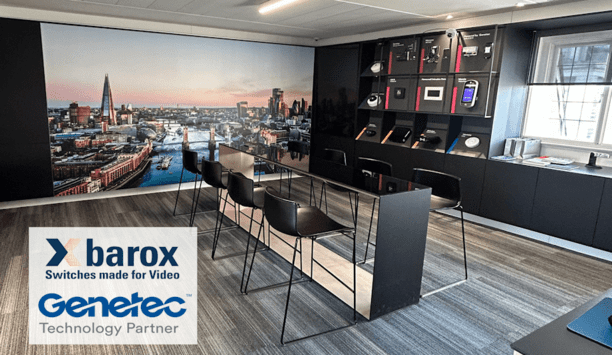
barox Kommunikation AG, a global pioneer in professional-grade switches, PoE media converters, and IP extenders, has elevated its collaboration with Genetec by featuring its DAP-approved solutions at the state-of-the-art Genetec Experience Center in central London. This achievement follows the successful launch of the barox Genetec DMS plug-in, a transformative solution that enhances flexibility, extends user control, and significantly reduces security network management costs. Seamless technology integration Center features barox PoE switches seamlessly integrated with advanced technologyVisitors to the Genetec Experience Center can now explore how this innovative integration streamlines operations and delivers exceptional value to end-users. The Center showcases a range of barox industrial and commercial PoE switches, seamlessly integrated with the advanced technology from Genetec. These switches power the facility’s cutting-edge demonstration equipment, illustrating the benefits of collaboration between barox and Genetec. The latest version of the barox Genetec DMS plug-in is on display, demonstrating its ability to simplify and fully integrate barox solutions within the Genetec™ Omnicast™ VMS interface. Empowering security solutions Omnicast offers a streamlined approach to managing security operationsGenetec Omnicast is a pioneer IP-based video management system (VMS) designed to provide real-time visibility and enable swift, informed decision-making. With its flexible and efficient architecture and ability to unify video with access control and intrusion systems, Omnicast offers a streamlined approach to managing security operations. The barox DMS plug-in amplifies these capabilities, integrating advanced SNMP trap functionality for real-time alerts, comprehensive network visualization of all connected devices and cable infrastructure, and offering powerful diagnostic tools for optimising system performance from within GSC Configurator Tool. Strengthening critical infrastructure The collaboration between barox and Genetec has already been embraced in Critical National Infrastructure and Smart City projects, underscoring the practical benefits of this powerful partnership. A partnership driving progress Sara Fisher, International Market Development Specialist at barox, expressed her enthusiasm about the collaboration: “We are thrilled to have our latest barox Genetec plug-in showcased at the Genetec Experience Center.” “This installation highlights the strength of our partnership and our shared commitment to delivering cutting-edge solutions that provide both technical excellence and financial advantages to our customers” she added. Innovation in integration Guillaume Remy, Strategic Partner Success Specialist at Genetec Inc., echoed this sentiment: “The inclusion of barox technology in our Experience Center represents a significant step in our collaboration. Together, we are demonstrating the future of seamless device integration, advanced functionality, and unmatched customer support.” Experience the future of security The Genetec Experience Center in central London provides visitors with an opportunity to experience firsthand how the integration of barox and Genetec technologies is redefining security solutions. This partnership showcases the power of collaboration and innovation, with the aim of setting new standards in the security industry.
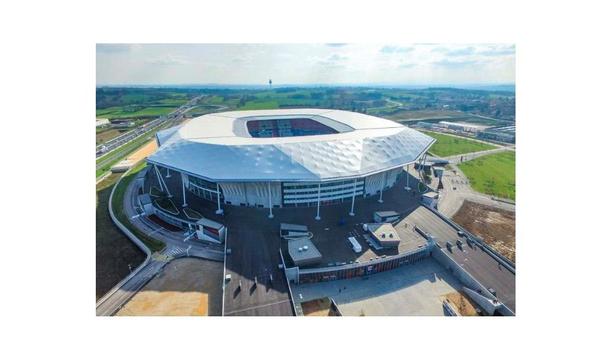
The Groupama Stadium — also known as the Grand Stade de Lyon— is a sports and recreation complex and soccer stadium that is located in the eastern metropolitan area of Lyon, France. With a maximum capacity of 59,186 seats, the venue hosts approximately 30 events per year such as sports games, concerts, and performances. The stadium is the third-largest stadium in France and the twenty-seventh in Europe. Situated in a town with only 25,000 residents, the stadium hosts twice as many spectators at its events. Efficiently managing crowds Under the leadership of Xavier Pierrot, Stadium Manager at Groupama Stadium, the team pays particular attention to the safety and well-being of community members as well as business owners, fans, players, journalists, and staff. Their mission is to ensure the highest levels of safety while maintaining impeccable service. The stadium’s security team wanted a security system that would help them efficiently to manage crowds To achieve these goals, the stadium’s security team wanted a security system that would help them efficiently manage crowds and ensure the safest experience for guests. The stadium also needed an effective security system to help them identify threats and pull evidence for law enforcement agencies following any incidents. Groupama Stadium entrusted the IT and security solutions selection to Orange Business Services, who recommended the Genetec™ Security Center with the Omnicast™ video surveillance solution. Unified security platform Security Center is the unified security platform that combines video surveillance, access control and license plate recognition systems into one intuitive solution. Prosegur, a specialist in security solutions integration, handled the system installation. The Omnicast video surveillance system met the complex’s specifications and budget. The security system is both reliable and easy to use for operators who can act quickly and discreetly in the event of an incident. “We followed the theme park model. Why? Quite simply because security is of the utmost importance but it must not be intrusive or become a source of anxiety. For families with children that are attending games, for example, this experience must be one of leisure. So, we needed a solid and reliable system. The Security Center platform had all the requirements to ensure the surveillance of the stadium in this particular context,” explained Xavier Pierrot. Remotely access video Operators use the Omnicast system to monitor over 260 Axis Communications cameras Thanks to the Federation™ feature of Security Center, operators centrally monitor video from all sites in the complex, including the training center and practice facility. The security team can view live video or remotely access video any time of the day. They can also easily go back and search through archived video, if necessary. Operators use the Omnicast system to monitor over 260 Axis Communications cameras. The system provides coverage of all entrances, concession stands, 7,000 parking spaces, and traffic routes around the site. Operators can easily find the cameras using the map interface of Security Center, Plan Manager. The map module provides a comprehensive view of any area of the site in one single click. Video surveillance solution “Since its installation, the Genetec Omnicast video surveillance solution has enabled us to resolve 100% of minor incidents; the vast majority of which were cases of theft or dropping of smoke bombs, and has helped us resolve major incidents that required the involvement of law enforcement,” says Xavier Pierrot. The entire security system is fully redundant, providing the highest levels of protection in this modern complex. All monitoring is now carried out from a central control room at the stadium, helping operators save time In case of servers, PCs, or power supplies malfunction, the failover and redundancy features of Security Center ensure that the system continues to run smoothly. All monitoring is now carried out from a central control room at the stadium, helping operators save time and become more efficient when responding to events. Teams never have to leave the control room for intervention because all decision-makers including law enforcement, the organizer, first responders, firefighters, and security operators have access to the system. Retrieve video recordings With the Security Center Omnicast system, users can easily view video, retrieve video recordings, zoom into precise details, print photos, save specific bookmarks, or manage alarms to secure various zones of the stadium environment and its perimeter. Using the Genetec Software Development Kit (SDK), the team at the POL has been able to integrate the IP video system with another third-party system to facilitate the transfer of evidence. The integration allows for secure gateways to be set up with certain public partners such as the police headquarters or the Interior Ministry, enabling the transfer of information during large-scale events such as Euro 2016. Facial recognition system Groupama Stadium would like to integrate a facial recognition system within the unified platform In accordance with privacy laws, and as a next step, Groupama Stadium would like to integrate a facial recognition system within the unified platform, so its team can automatically be alerted to banned persons as they enter the stadium. “Since Security Center is flexible and scalable, we plan to continue evolving the platform and taking full advantage of its potential in order to better protect our guests, community members, and staff,” concluded Xavier Pierrot. The Omnicast system of the Security Center manages 262 Axis Communications network cameras, including various models and a few 360° domes. All seats are monitored by three different cameras, two fixed and one dome to ensure several viewpoints. The cameras record continuously.

One of the key problems in airport security is the sheer size of the perimeter and a large number of incidents are in fact linked to unauthorized access onto the airfield, either runways or where aircrafts are being loaded or refueled posing an extremely high risk. Most airports will combine multiple sensors and technologies to protect the actual perimeter fence and even beyond the perimeter fence, to warn of potential threats. OPTEX LiDAR sensor integration with RSA module Some airports have found the level of information generated by the perimeter security systems quite challenging to deal with and they wanted to decrease the number of events so operators could focus on what was critical. The Airport development team at Genetec integrated the OPTEX LiDAR sensor into their Restricted Security Area (RSA) Surveillance module, an extension of the Genetec Security Center platform with the purpose to unify data from the sensor and camera to present more meaningful information to the operators. Restricted Security Area Surveillance module The RSA module has been designed specifically with a view to providing wide area protection The RSA module has been designed specifically with a view to providing wide area protection and integrating with wide area surveillance technology, including radar, fiber optic and laser detection devices. The solution allows security staff to determine the level of threat for each area, map them, and utilize OPTEX technologies to identify and locate quickly and precisely the point of intrusion. For instance, with Fiber optic fence sensor, zones can be 100m-200m long and will identify people cutting through a fence, crawling under or climbing over. Newer fiber technologies provide point location. Another way to pin-point exact intruder location is with OPTEX LiDAR technologies or with Radar. ‘Fuse’ data into a single event A particularly intelligent feature of the system is its ability to ‘fuse’ data (known as ‘target fusion’) coming from multiple sources and confirm an event as a single (i.e. the same) activity rather than a multiple threat. For instance, using the X&Y coordinates provided by OPTEX REDSCAN sensors, RSA allows to map exactly the path of the intruders or moving vehicles, fuses the path from one camera to the other and considers it as one event, one target and tracks it precisely on the map. Intelligent Tracking and event categorization This gives a more meaningful picture to the operator and presents events in a unified and intelligent way. This helps support the security team in making the right decisions. The deeper integration of OPTEX’s technologies into Genetec’s RSA platform enables intelligent tracking and event categorization, making it a very precise security system for airports.
Insights & Opinions from thought leaders at Genetec, Inc.

Passwords originated in ancient times, used by Roman military forces around the first century BC. Since then, passwords have evolved from physical words to the computer access control tools used today. Passwords are easy to implement, widely supported, and familiar to users. However, they are easily forgotten, stolen through phishing, prone to reuse, and vulnerable to credential-harvesting or brute-force attacks. We asked our Expert Panel: What is the role of passwords in physical security?

Critical national infrastructure encompasses sectors such as energy, utilities, healthcare, and data centers – environments that underpin economic stability and public safety. With so much at stake, the importance of effective security systems is that much higher. We asked our Expert Panel Roundtable: What are the unique aspects of the critical infrastructure market, and how should the security industry adapt?

Biometrics today provide better security and frictionless user experiences. Biometric identifiers like fingerprints, facial recognition, and iris scans are unique and difficult to forge. They eliminate the vulnerabilities of traditional authentication and streamline secure access control. Identity verification reliably protects sensitive digital information and physical entry. We asked our Expert Panel Roundtable: How is the role of biometrics evolving in physical access control?

The Key To Unlocking K12 School Safety Grants
Download
Honeywell GARD USB Threat Report 2024
Download
Physical Access Control
Download
The 2024 State Of Physical Access Trend Report
Download
The Security Challenges Of Data Centers
Download
Genetec Announces General Availability of Synergis Master Controller (SMC)

Genetec Showcased Latest Advances In IP License Plate Recognition, Video Surveillance And Access Control Technology At ASIS 2012
Security Center Mobile - Instant Information At The Touch Of A Button